

Data Quality 9.x: Developer, Level 1 (Blended Learning)
Blended Learning | Data Quality | 2 Days (55% lecture, 45% hands on labs, 10 hours onDemand)
Data Quality 9.x: Developer, Level 1 (Blended Learning)
Course Overview
This course has been developed following a blended learning approach that allows the student to take advantage of the flexibility and convenience of an online course while retaining the benefits of the instructor led classroom experience. Learners benefit from multiple learning channels and media formats – so this approach is more likely to appeal to all learning styles.
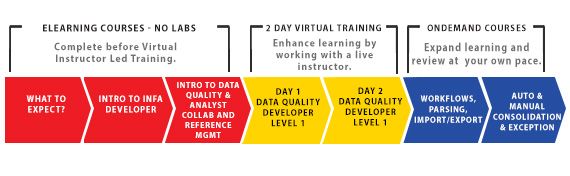
We are following a 3 step approach:
- We have developed eLearning Modules to introduce the student to the concepts of Data Quality and provide them with a strong foundation. Students can learn at a time and pace that suits them.
- Following this, our 2 day instructor led course covers the Core elements of Data Quality. Students are more prepared and have a foundation that enables them to benefit more from the Instructor Led Modules. They will perform tasks such as profiling and identifying anomalies, developing mappings and mapplets for use in processes such as data standardization and identifying duplicate records.
- There are elements to the software that not every student will want to cover at the same time. It makes more sense to allow students go through these modules and labs at a time when the information is relevant to them. Because of this we have developed a series of onDemand Modules that allow the user learn at their own pace and work on labs in a preconfigured environment.

Objectives
After successfully completing this course, students should be able to:
- Navigate the Developer Tool and collaborate on projects with Analysts.
- Perform Column, Rule, Multi object, Comparative and Mid-Stream Profiling.
- Manage reference tables.
- Create standardization, cleansing and parsing Mappings and Mapplets.
- Identify duplicate records using Classic Data Matching.
- Build mappings to associate and consolidate matched records.
- Create and execute Workflows to populate user inboxes with Exception and Duplicate record tasks.
- Run data quality mappings in DQ Standalone.
Target Audience
- New users of Informatica Developer, including Business and Data Developers
- Users who wish to re-familiarize themselves with the Developer tool
Prerequisites
- Windows GUI and theoretical understanding of process development and design
QUESTIONS?
Blended Learning | Data Quality | 2 Days (55% lecture, 45% hands on labs, 10 hours onDemand)

